The Windows Game
About The Windows Game
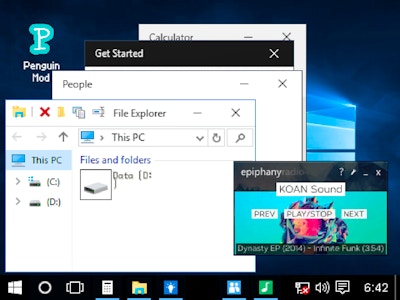
The Windows Game turns a familiar Windows 10 desktop into a simulation packed with mini-games. You click through system-like windows and icons to find shooting simulations, painting tools, and multitasking challenges tucked inside the interface. It blends nostalgic desktop design with small interactive surprises, letting you explore at your own pace instead of following one fixed path.
How to play The Windows Game
Open the game in your browser and start exploring the desktop interface as you would a real computer. Click on icons, windows, and menus to uncover the different activities inside, including shooting simulations, painting, and multitasking tasks. Keep exploring different parts of the interface, since hidden gems and extra features are tucked into the system elements. There is no download needed, so you can jump straight into clicking around.
Tips for playing The Windows Game
- Click on every icon and window you see, since mini-games are hidden inside ordinary looking system elements.
- Try the painting tool if you want a slower, creative break from the other activities.
- Listen for the authentic system sounds, they often hint that you have found something interactive.
Frequently asked questions
What is The Windows Game?
It is a free browser simulation that reimagines the Windows 10 interface as a playground of mini-games, including shooting simulations, painting, and multitasking challenges.
Do I need to download The Windows Game?
No, it runs entirely in your browser on phone or computer, so there is nothing to install.
What can I do inside The Windows Game?
You can explore a familiar desktop layout to find hidden mini-games, try painting tools, take on multitasking challenges, and discover hidden gems tucked into the system elements.